
Introduction
Cloud Computing has changed the way people and businesses use technology. In the past, companies had to buy expensive hardware, manage servers, and spend a lot of money on software installations. Today, things are different. With cloud computing, users can access files, applications, and services through the internet without depending on physical systems.
From streaming platforms to online storage, cloud computing is now part of daily life. Whether someone is checking emails, saving photos online, or attending virtual meetings, cloud-based technology works quietly in the background. Because of its convenience and flexibility, more businesses are moving their operations to the cloud every year.
For beginners, cloud computing may sound technical and complicated. However, the concept is simple. It allows people and organizations to use computing resources whenever they need them instead of buying expensive systems. This approach reduces costs, improves efficiency, and creates better opportunities for growth.
In this guide, readers will learn what cloud computing means, why it matters, how it works, its benefits and risks, common mistakes to avoid, and practical tips for getting started successfully.
What Is Cloud Computing?
Cloud computing is the delivery of computing services through the internet. Instead of storing data or running software on a local computer, users can access these services online. These services may include storage, databases, networking, servers, and software applications.
Simply put, cloud computing means using online systems instead of physical hardware located in one place. For example, storing photos in online storage instead of keeping them only on a laptop is an example of cloud computing.
Businesses use cloud computing to improve operations, reduce costs, and increase flexibility. Individuals also benefit because they can access information anytime and from almost any device.
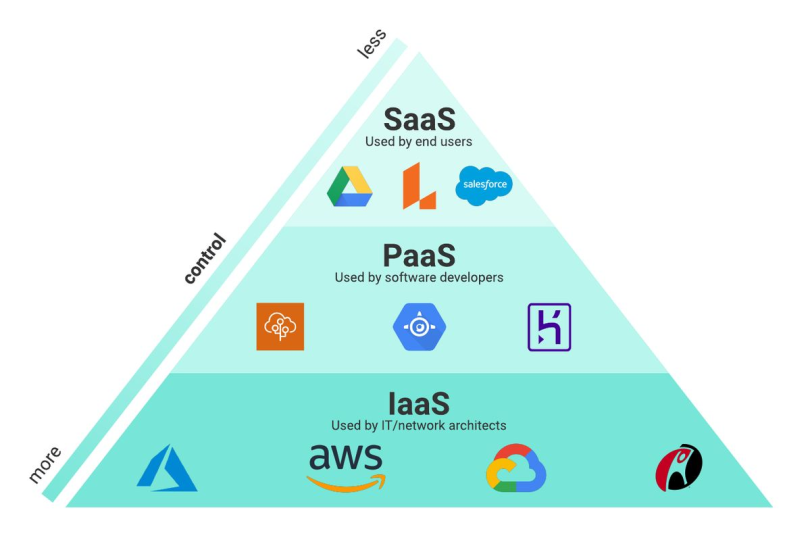
There are three main service models in cloud computing:
- Infrastructure as a Service (IaaS)
This model provides virtual servers, storage, and networking resources. - Platform as a Service (PaaS)
Developers can build and test applications without managing infrastructure. - Software as a Service (SaaS)
Users access software through the internet without downloading or installing it.
Cloud computing works because internet-connected systems allow remote access to computing resources. As a result, businesses no longer need to depend entirely on traditional systems.
Why Is Cloud Computing Important?
Cloud computing has become important because it improves flexibility, efficiency, and cost management. Companies no longer need expensive hardware to run operations.
One major reason for its importance is accessibility. Employees can work remotely and still access business systems. This became especially valuable when remote work increased around the world.
Another reason is scalability. Businesses can quickly increase or reduce computing resources based on their needs. Instead of investing heavily in equipment, organizations can simply adjust their cloud usage.
Cloud computing also improves collaboration. Teams can work together on documents, projects, and software from different locations without delays.
Security improvements are another benefit. Many cloud service providers invest heavily in data protection, backups, and system monitoring.
In addition, cloud computing supports innovation. Businesses can launch websites, applications, and digital services much faster than before.
Detailed Step-by-Step Guide
Step 1: Understand Your Needs
Before using cloud computing, identify your goals. Ask yourself what you want to achieve.
For example:
- Do you need file storage?
- Are you running business applications?
- Do you want better teamwork?
- Are you trying to reduce IT costs?
Knowing your purpose makes it easier to choose the right cloud solution.
Step 2: Learn the Different Cloud Models
There are three major cloud deployment models:
Public Cloud
A public cloud is managed by external providers. Resources are shared among many users, making it affordable and easy to access.
Private Cloud
A private cloud is designed for one organization. It provides more control and stronger customization.
Hybrid Cloud
A hybrid cloud combines public and private cloud systems. Businesses often choose this option for flexibility.
Step 3: Choose the Right Cloud Service
Selecting the right cloud service depends on your goals.
For example:
- Businesses needing software may choose SaaS.
- Developers may prefer PaaS.
- Organizations managing servers often choose IaaS.
Choosing wisely helps improve efficiency and reduce unnecessary spending.
Step 4: Plan Security Measures

Security is extremely important in cloud computing.
Here are useful steps:
- Use strong passwords.
- Enable multi-factor authentication.
- Regularly back up important data.
- Train users about online threats.
- Monitor account access.
These actions reduce security risks significantly.
Step 5: Migrate Data Carefully
Moving to cloud computing requires proper planning.
Start by:
- Identifying important files.
- Testing systems before migration.
- Backing up existing information.
- Moving data gradually.
A careful migration process prevents major disruptions.
Step 6: Monitor Performance
After implementation, monitor how the cloud system performs.
Check:
- Speed
- Security
- Storage usage
- Costs
- Team productivity
Regular monitoring helps improve performance over time.
Benefits of Cloud Computing
Cloud computing offers many advantages for both businesses and individuals.
- Cost Savings
Businesses spend less money on hardware and maintenance. - Accessibility
Files and systems can be accessed from almost anywhere. - Flexibility
Resources can increase or decrease based on demand. - Improved Collaboration
Teams can work together in real time. - Automatic Updates
Many cloud systems update automatically. - Data Backup and Recovery
Information can often be restored quickly. - Better Productivity
Employees spend less time handling technical problems. - Scalability
Businesses can grow without major infrastructure costs. - Environmental Benefits
Cloud systems often reduce energy waste. - Faster Innovation
Companies can launch products and services more quickly.
Disadvantages and Risks
Although cloud computing offers benefits, it also comes with challenges.
- Internet Dependency
Without internet access, cloud services may become difficult to use. - Security Concerns
Poor security practices can increase risks. - Limited Control
Users may have less control over infrastructure. - Downtime Issues
Technical problems can temporarily affect access. - Data Privacy Risks
Sensitive information may require stronger protection. - Unexpected Costs
Poor planning can lead to higher expenses. - Migration Challenges
Switching systems can sometimes become complicated.
Understanding these risks helps users prepare effectively.
Common Mistakes to Avoid
Many beginners make mistakes when starting with cloud computing.
One common mistake is choosing the wrong service. People often select solutions without understanding their actual needs.
Another issue is ignoring security. Weak passwords and poor access management can create serious problems.
Some businesses fail to monitor costs. While cloud computing can save money, poor planning sometimes increases expenses.
Another mistake is skipping employee training. Team members should understand how cloud systems work.
Rushing migration is also risky. Moving everything too quickly may cause data loss or confusion.
Lastly, many users forget regular backups. Although cloud systems offer storage, keeping extra backups is always a smart decision.
FAQs
1. What is cloud computing in simple words?
Cloud computing means using computing services over the internet instead of relying only on physical devices. It helps users access files, software, and systems online.
2. Is cloud computing safe?
Cloud computing can be safe if users follow strong security practices. Using strong passwords, backups, and authentication methods improves protection.
3. Why do businesses prefer cloud computing?
Businesses prefer cloud computing because it reduces costs, improves flexibility, and allows better teamwork across different locations.
4. What are examples of cloud computing?
Examples include online storage, email services, video streaming, and online collaboration tools.
5. Can small businesses use cloud computing?
Yes, small businesses can benefit greatly. It helps reduce expenses and improves efficiency without major investments.
6. What skills are needed for cloud computing?
Basic technical knowledge, understanding of online systems, and cybersecurity awareness are helpful skills.
Expert Tips and Bonus Points
If you are new to cloud computing, begin with small projects. Testing smaller systems first helps reduce mistakes.
Always compare service providers before making decisions. Look at features, pricing, customer support, and security options.
Keep learning about cloud trends because technology changes quickly. Staying updated improves long-term success.
Use automatic backups whenever possible. This helps protect important information.
Avoid depending on only one system. Having alternatives can reduce disruptions during technical issues.
Most importantly, focus on security from the beginning. Prevention is easier than fixing problems later.
Conclusion
Cloud computing has transformed modern technology by making services more flexible, accessible, and cost-effective. Instead of relying entirely on physical hardware, people and businesses can now use online resources whenever needed. This approach has improved productivity, teamwork, and innovation across different industries.
For beginners, learning cloud computing may seem difficult at first. However, understanding the basics makes everything easier. By choosing the right model, planning carefully, and following strong security practices, users can enjoy the many advantages of cloud systems.
Although risks such as security concerns and downtime exist, proper planning can reduce most problems. Businesses of all sizes now depend on cloud computing to improve efficiency and support growth. Even individuals benefit from online storage, communication tools, and digital services every day.
As technology continues to grow, cloud computing will likely become even more important. Learning about it today can create valuable opportunities in the future. Whether someone wants to improve personal productivity or support business success, understanding cloud computing is a smart investment in the digital age.